
EduPrompt - AI-Powered Learning Assistant

Get answers for your questions about:

Academic Subjects, General Questions, Mathematics, Science, Physics, Chemistry, Biology, History, Geography, English, Computer Science, Competitive Exams, JEE (Main & Advanced), NEET (Medical), IIT Preparation, IAS/UPSC, GATE, CAT/MBA, SSC Exams, Banking Exams

Answer

Your answer will appear here
Welcome to EduPrompt

Welcome to EduPrompt

Your Smart Study Companion

Instant Answers. Smarter Learning.

Struggling with a tough question? Need quick help with homework or exam prep?
EduPrompt is here to make learning easier. Whether it's science, math, literature, or any subject in between, simply ask and get instant, accurate answers — all in one place.

✅ Why Choose EduPrompt?

Instant Solutions No waiting. Get answers in seconds.
Covers All Subjects From math to history, we've got you covered.
Student-Friendly Interface Simple, clean, and easy to use.
Available 24/7 Study support whenever you need it.

📚 How It Works

  1. Type your question in the search bar.
  2. Get your answer instantly.
  3. Understand better and move ahead with confidence.

🌟 Join Thousands of Students Using EduPrompt

EduPrompt is designed to empower students with the knowledge they need — instantly and effortlessly. Whether you’re revising for exams or working through assignments, EduPrompt is the perfect academic assistant.

🚀 Coming Soon: EduPrompt Mobile App

Learn on the go! Our mobile app is launching soon to bring smart learning right to your fingertips.

🔍 Try It Now

Online Learning Now In Your Fingertips

Unlock the power of knowledge with our upcoming mobile app, bringing online learning right to your fingertips. Stay tuned for an easy and accessible learning experience on the go!

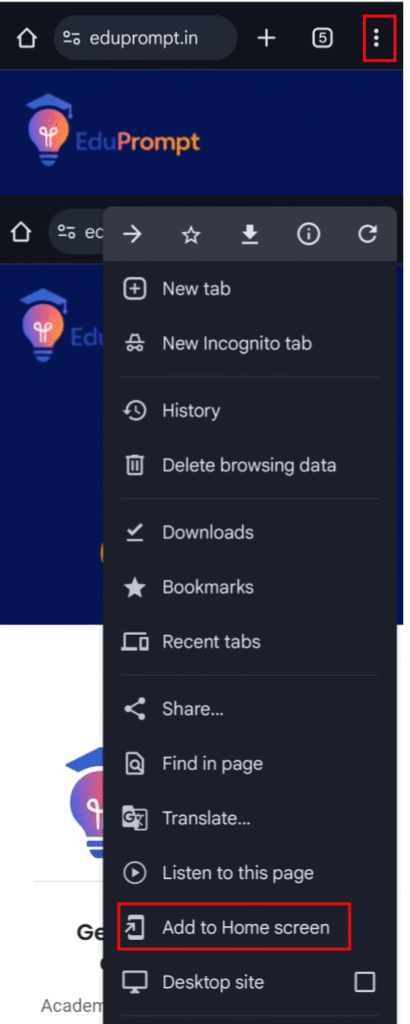
Add to Home Screen Guide

📲 Add EduPrompt to Your Mobile Home Screen

Add to Home Screen Guide

✅ For Android Users (Google Chrome)

1
Open Chrome browser on your Android phone.
2
Go to https://www.eduprompt.com.
3
Tap the three-dot menu (top-right corner).
4
Tap "Add to Home screen".
5
Tap "Add" to confirm. EduPrompt will appear on your home screen.

🍎 For iPhone Users (Safari)

1
Open Safari on your iPhone.
2
Go to https://www.eduprompt.com.
3
Tap the Share icon (square with arrow pointing up).
4
Scroll down and tap "Add to Home Screen".
5
Tap "Add" to confirm. EduPrompt will be added to your home screen.

❓ Frequently Asked Questions

EduPrompt is an AI-powered tool that provides instant answers to students' questions across all subjects.

Yes! EduPrompt is completely free and available to all students anytime.

EduPrompt covers subjects like Math, Science, English, History, Geography, and more.

No sign-up is required. Just type your question and get your answer instantly.

Our mobile app is launching soon for both Android and iOS platforms!